

How to setup ChibiStudio
Introduction
In this article we are going to see how to setup ChibiStudio, an Eclipse-based toolchain that conveniently helps to develop embedded firmware for different microcontroller families.
We are going to install ChibiStudio for Windows 2022-01 but the user should always pick the latest version for his Operating System. Every update of ChibiStudio comes with a newer version of ChibiOS, Compiler and Debugger. Older versions of ChibiStudio, as well as a changelog can be found here.
Step by Step Procedure
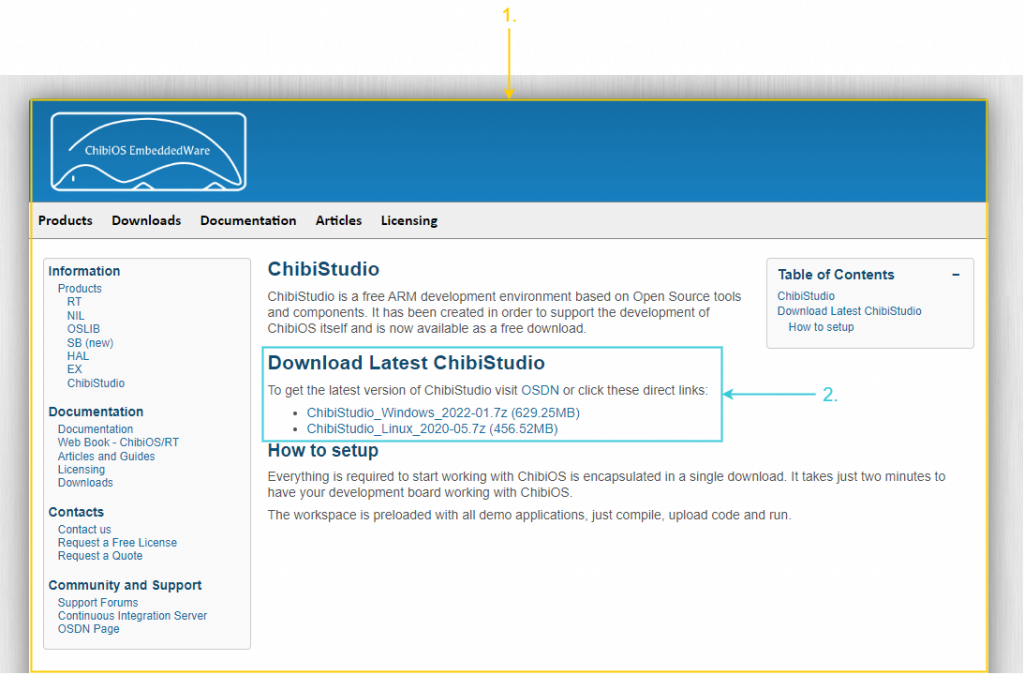
Get the latest version of ChibiStudio
- Go to the Official page of ChibiStudio
- Download Windows or Linux latest version
Extract the package
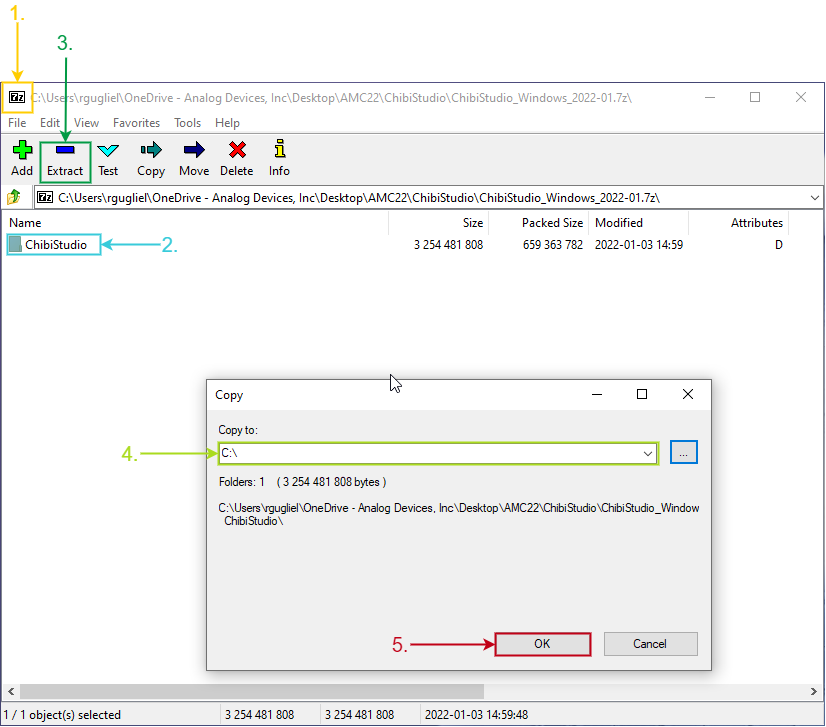
- Open the downloaded package with 7zip ( download it for free from 7-zip.org)
- Select the folder ChibiStudio
- Click on Extract
- Choose C:\ as destination
- Press ok
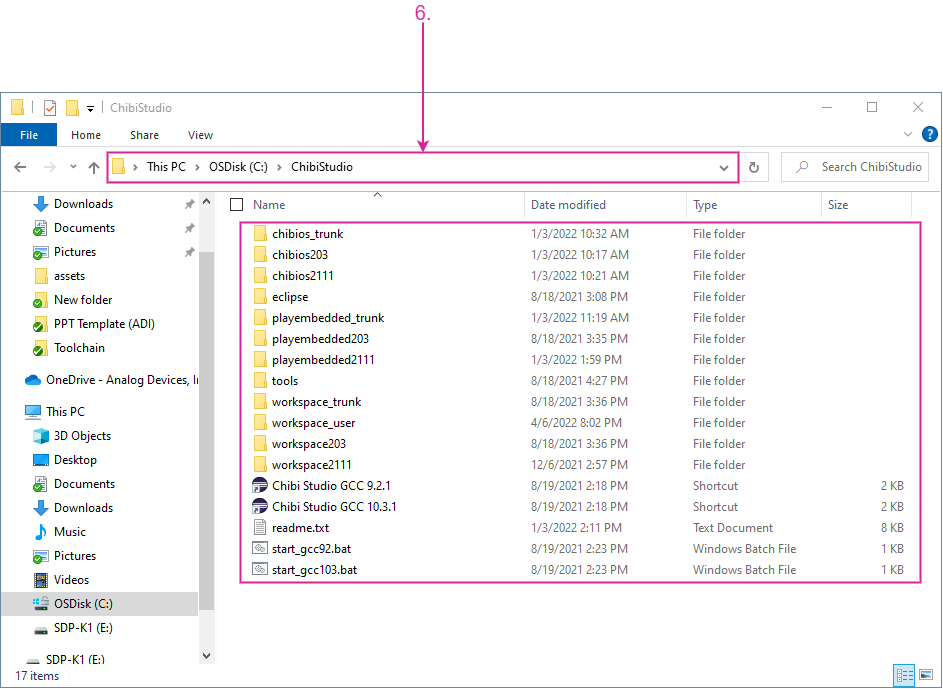
- Check that ChibiStudio is located at C:\ChibiStudio otherwise the toolchain will not work
Launch the toolchain
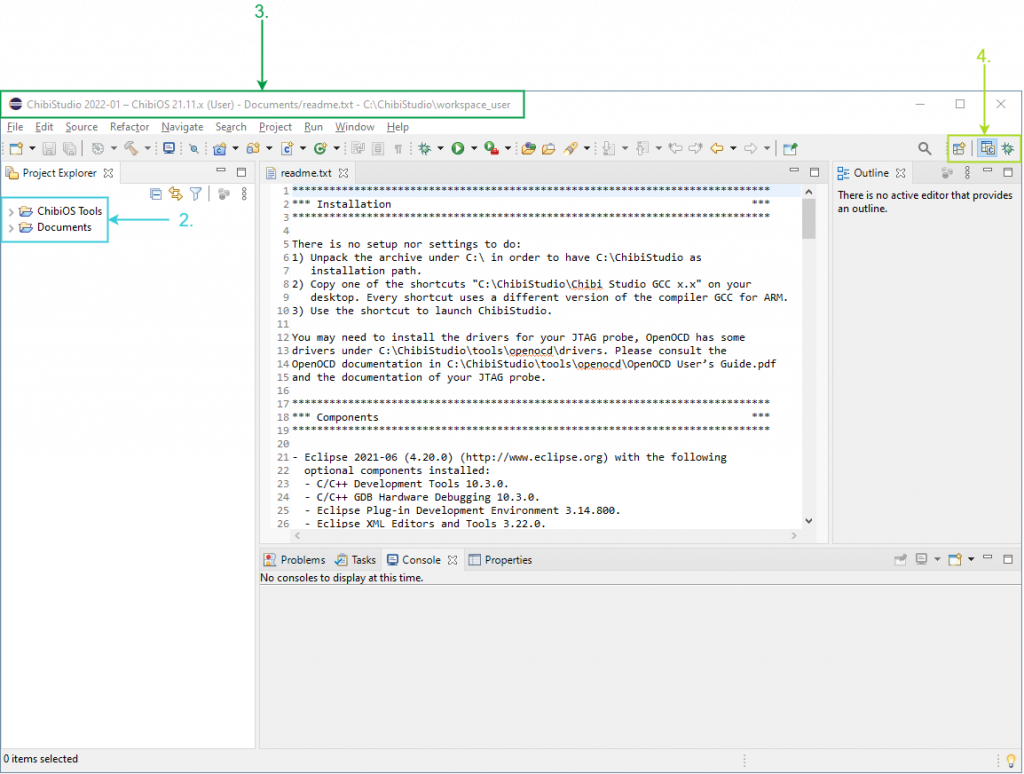
- Copy the link Chibi Studio GCC x.x onto the desktop and double click on this link to launch the toolchain
- Check the Project Explorer contains ChibiOS Tools and Documents
- Check the bar title contains the version of ChibiStudio and ChibiOS in use as well as the location of the workspace
- Check the toolchain starts with the perspectives C and Debug
Throubleshoot
My ChibiStudio looks very different from the picture above
Cause
It is probable that some files got corrupted or lost while extracting ChibiStudio. There are a few possible causes:
- You are not using 7zip as package extractor
- You extracted the package in a folder and then copied it under C: and some files got corrupted as their path became longer then 260 characters.
- Your antivirus wrongly classified some of the files from ChibiStudio as potential threats and quarantined them.
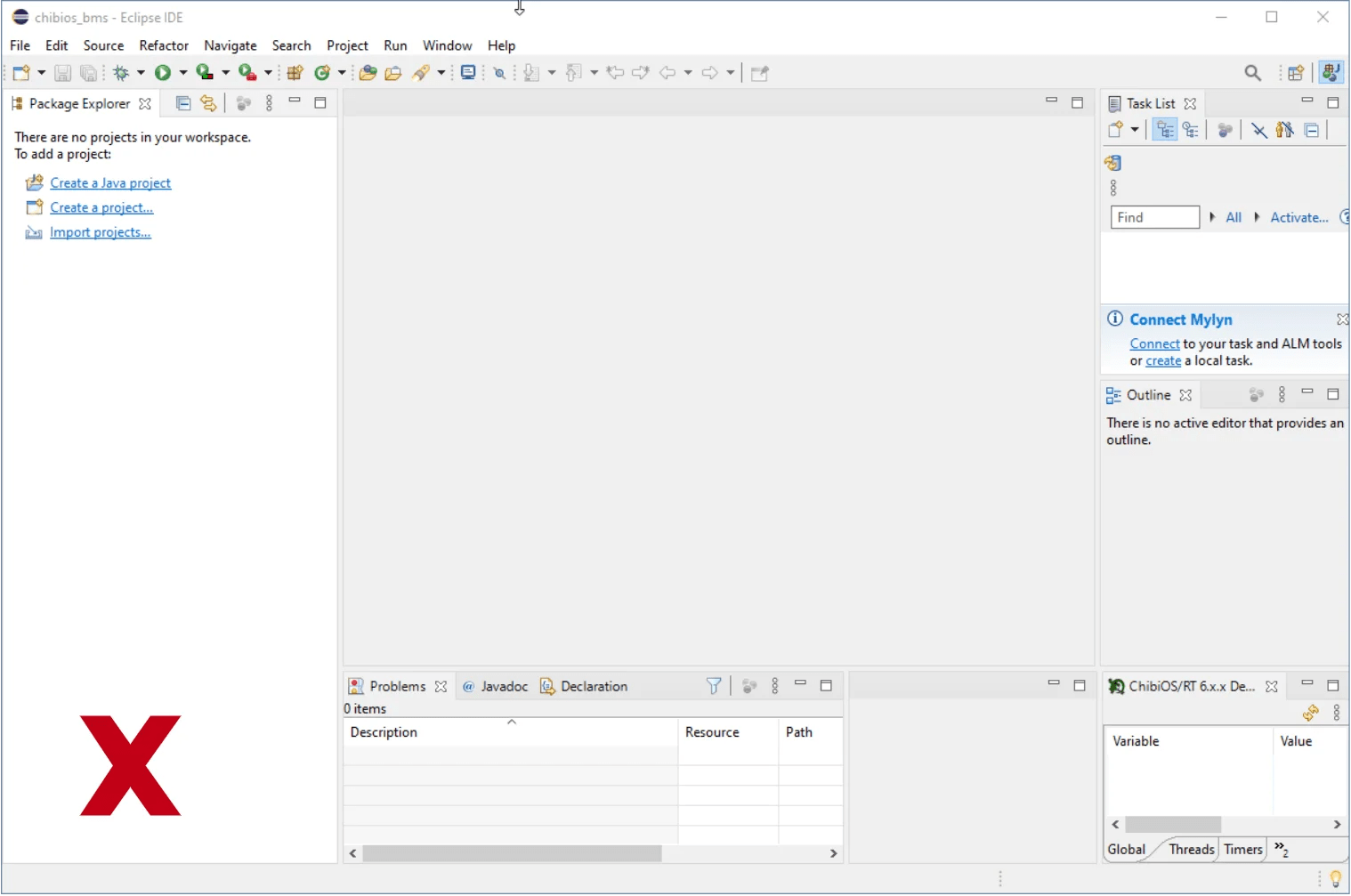

Solution
Clean up the previously extracted folder and start over being sure to:
- Use the latest version of 7zip
- Extract directly under C:\
- Configure your antivirus for an exception on ChibiStudio files
My ChibiStudio starts but I got errors when building projects
Cause
It is probable that you extracted ChibiStudio at the wrong path or that your antivirus blocked/quarantined the compiler executables.
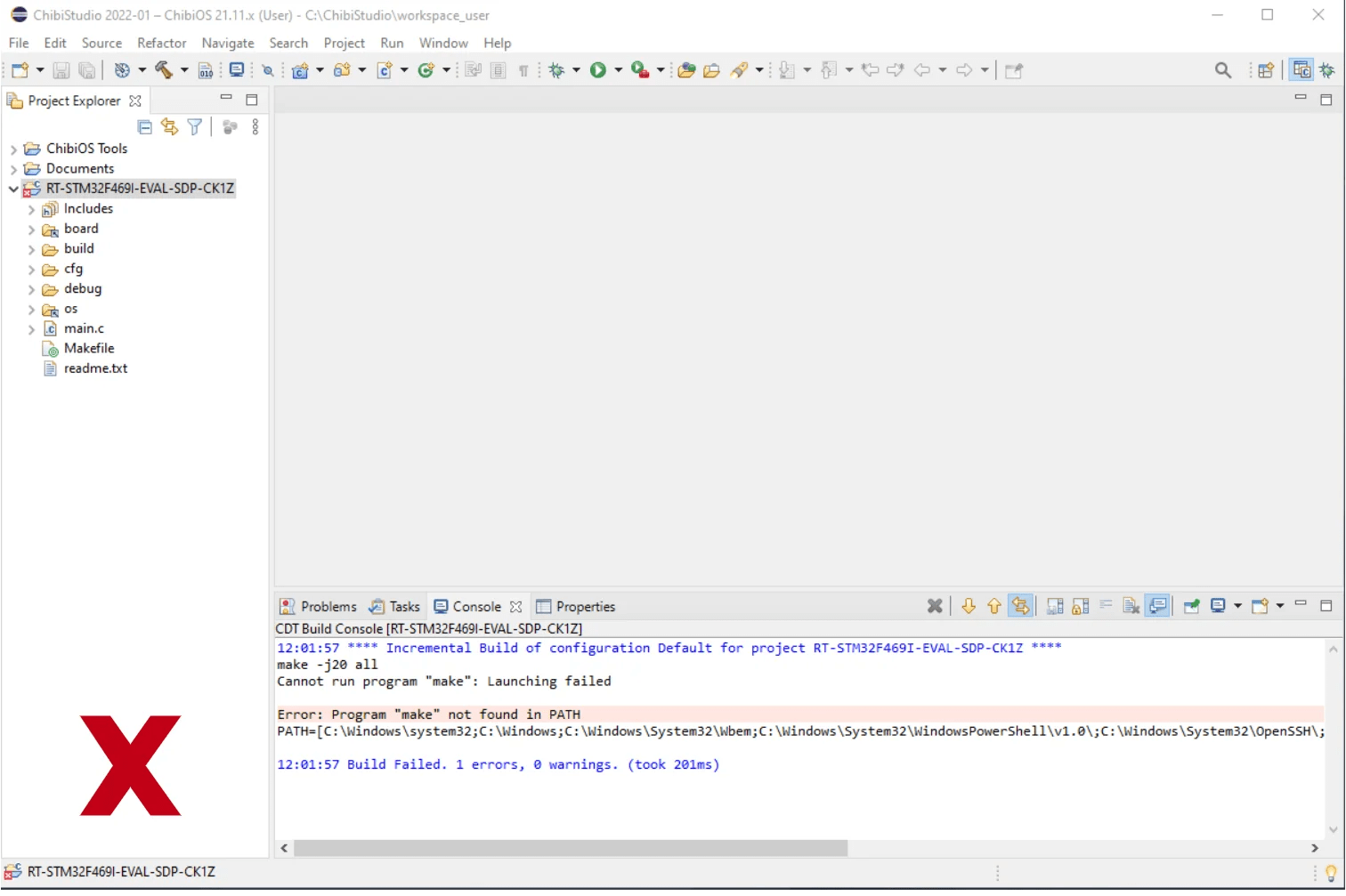

Solution
Clean up the previously extracted folder and start over being sure to:
- Use the latest version of 7zip
- Extract directly under C:\
- Configure your antivirus for an exception on ChibiStudio file
I am trying to flash the firmware that is given already with the chibi studio and following the video:
https://www.youtube.com/watch?v=BsQm4dbj0A4&list=PLpDawCIUjDFEE7-GBOBlwlhntEtmyHlbz&index=4
i have done everything according to the provided videos but still I receive this error:
Program file does not exist
C:\ChibiStudio\chibios2111\demos\STM32\RT-STM32F407-DISCOVERY not found
C:\ChibiStudio\chibios2111\demos\STM32\RT-STM32F407-DISCOVERY not found
C:\ChibiStudio\chibios2111\demos\STM32\RT-STM32F407-DISCOVERY not found
Hi Shahab, you need to be a little more detailed than that.
What version of ChibiStudio are you using? What evaluation kit?
Does the project build?
Are you able to launch OpenOCD?
Hello –
I am attempting to install Chibistudio on Ubuntu 24.04 LTS. I have downloaded the ChibiStudio_Linux_2023-02.7z file and have uncompressed it. I have copied out the ChibiStudio folder and have placed it under ~/Projects which seems to be necessary based on the contents of ChibiStudio-GCC11.3.1q3. However, when I start it I get this error message that says “Could not launch the product because the specified workspace cannot be created. The specified workspace directory is either invalid or read-only.” I have also tried deleting ~/Projects/ChibiStudio/workspace_user/.metadata/.lock to no avail. Could you please let me know what the right steps are?
Thanks,
John Blessing
Hey John,
I never played with ChibiStudio on Linux but Giovanni did. I believe it makes sense to ask specific questions to him on the official forum of ChibiOS
ChibiOS Forum
Note that if I hit OK on that error message I mentioned above, then a new error shows up “Please choose another workspace as ‘/home/chibios/Projects/ChibiStudio/workspace_user’ is currently in use.” (note the user name used, chibios, which is not my user name)
Did you get it figured out? I’m running on Ubuntu, and it seems that the latest version requires everything to be run under user “chibios” and ChibiStudio is under /home/chibios/Projects.
Yes, I got it working. In my case I made a symbolic link from /home/chibios/Projects to /home/myusername/Projects . That method seems to work as well.
Thanks for sharing your experience!