

How to build a project in ChibiStudio
Introduction
A project in Eclipse is a collection of source files and metadata associated with a filesystem directory. Projects can be found in the Project Explorer. In this article, you will learn how to build a new project.
Step by Step Procedure
Open the project
- Right click the project’s name and select Open or
- Double click the project folder
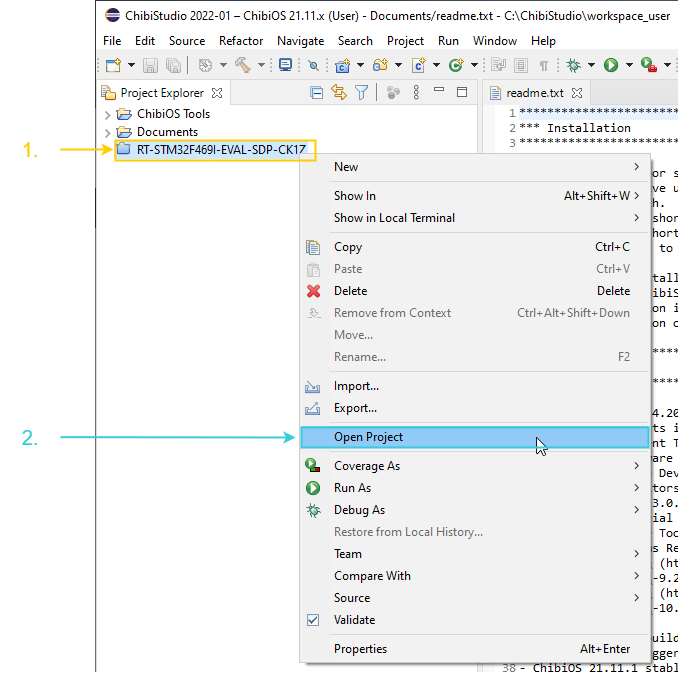
The icon of an opened project will change from  to
to  . You can expand it and see its resources.
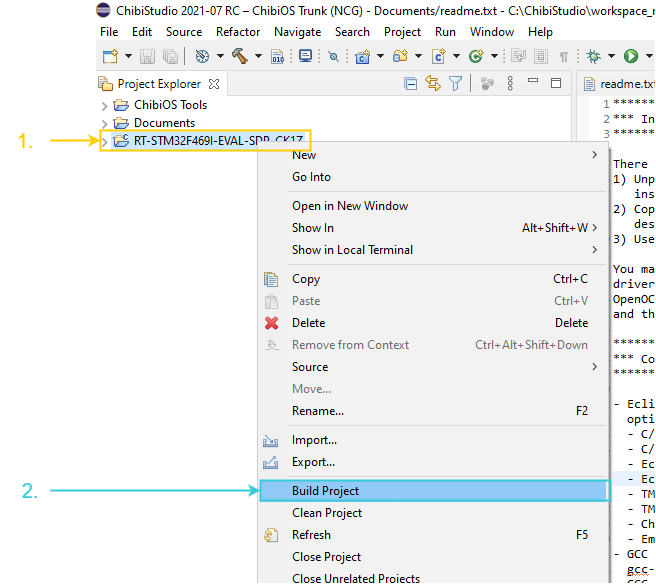
Build – Method 1
- Right-click on the project folder
- Select Build project
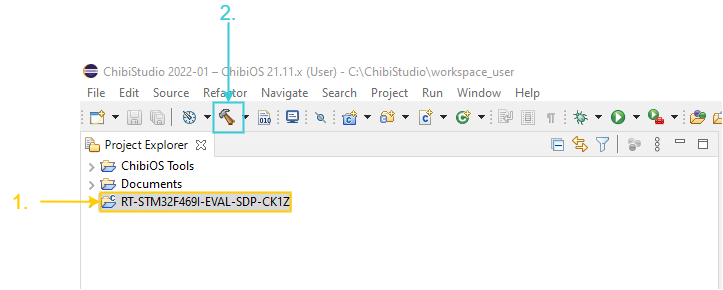
Build – Method 2
- Select the project folder
- Click on the hammer button

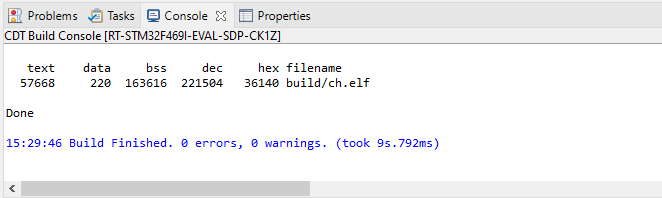
Check that the build was successful
A successful build will yield the console message shown below.
I am getting the following error when building my first project:
make: *** No rule to make target ‘../../../os/common/startup/ARMCMx/compilers/GCC/mk/rules.mk’. Stop. RT-STM32F767ZI-NUCLEO144 C/C++ Problem
I am using ChibiosStudio 2023-02. Any suggestions would be appreciated.
Hi Robert, if the project is located in the workspace you need to amend the makefile.
To do so you need to update the variable CHIBIOS in the makefile to point at were your chibios folder is in relationships to your makefile.
E.g. CHIBIOS = ../../chibios2111
I am buildling ‘VESC project’,which is based on chibios,with chibistudio, but I get the error as follows:
c:/chibistudio/tools/gnu tools arm embedded/11.3 2022.08/bin/../lib/gcc/arm-none-eabi/11.3.1/../../../../arm-none-eabi/bin/ld.exe: c:/chibistudio/tools/gnu tools arm embedded/11.3 2022.08/bin/../lib/gcc/arm-none-eabi/11.3.1/thumb/v7e-m+fp/hard\libg.a(libc_a-abort.o): in function `abort’:
/data/jenkins/workspace/GNU-toolchain/arm-11/src/newlib-cygwin/newlib/libc/stdlib/abort.c:59: undefined reference to `_exit’
c:/chibistudio/tools/gnu tools arm embedded/11.3 2022.08/bin/../lib/gcc/arm-none-eabi/11.3.1/../../../../arm-none-eabi/bin/ld.exe: c:/chibistudio/tools/gnu tools arm embedded/11.3 2022.08/bin/../lib/gcc/arm-none-eabi/11.3.1/thumb/v7e-m+fp/hard\libg.a(libc_a-signalr.o): in function `_kill_r’:
/data/jenkins/workspace/GNU-toolchain/arm-11/src/newlib-cygwin/newlib/libc/reent/signalr.c:53: undefined reference to `_kill’
c:/chibistudio/tools/gnu tools arm embedded/11.3 2022.08/bin/../lib/gcc/arm-none-eabi/11.3.1/../../../../arm-none-eabi/bin/ld.exe: c:/chibistudio/tools/gnu tools arm embedded/11.3 2022.08/bin/../lib/gcc/arm-none-eabi/11.3.1/thumb/v7e-m+fp/hard\libg.a(libc_a-signalr.o): in function `_getpid_r’:
/data/jenkins/workspace/GNU-toolchain/arm-11/src/newlib-cygwin/newlib/libc/reent/signalr.c:83: undefined reference to `_getpid’
Hi Bill,
are you able to build a default project? This will help you to verify that your setup is correctly done.